Overview
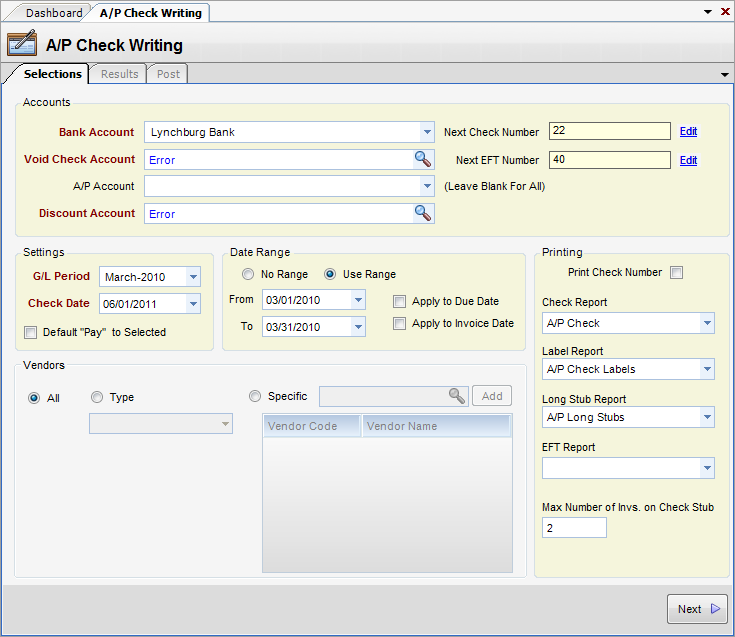
The Selection Tab displays the settings that determine which invoices are to be processed. Checks that are processed from A/P Check Writing are generated from the vendor invoices that have been entered into the Purchase Journal. The checks themselves are then posted into the Disbursement Journal.
Field Descriptions
Accounts Section
| • | Bank Account - The bank account to which checks will be posted. |
| • | Void Check Account - G/L Account to use as offset for void checks. (All transactions in InFocus require at least two sides). |
| • | A/P Account - A/P account to use for invoice selection. Leave blank for all. |
| • | Discount Account - G/L Account to use for net discounts. |
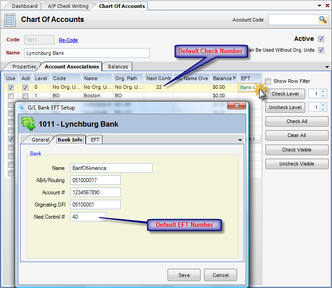
| • | Next Check Number - Next check number to use. Defaults from the next control number field of the bank account record on the Account Associations tab in General Accounting>Chart of Accounts. |
| • | Next EFT Number - Next check EFT number to use. Defaults from the next control number field of the bank account record on the Account Associations tab (EFT column) in General Accounting>Chart of Accounts. |
Note: The Edit button next to the check number allows a user to directly change the next check number in this screen.
Settings
| • | G/L Period - The G/L period to which checks are posted. |
| • | Check Date - Date of checks |
| • | Default "Pay" to Selected - When checked, defaults to pay the selected invoices. |
Date Range
| • | No Range - When checked, no range will be used for invoice selection |
| • | Use Range - When checked, a date range will be used for invoice selection. |
| • | From - Starting date of invoice selection |
| • | To - Ending date of invoice selection |
| • | Apply to Due Date - When checked, invoices with a due date between the From and To Dates will be selected. |
| • | Apply To Invoice Date - When checked, invoices with an invoice date between the From and To Dates will be selected. |
Vendors
| • | All - When checked, open invoices for all vendors will be included. |
| • | Specific - When checked, open invoices for the specified vendors will be selected. |
Printing
| • | Print Check Number - When checked, the check number will print on the face of the check. |
| • | Check Report - Report design to be used to print the check. |
| • | Label Report - Report design used to print check labels |
| • | Long Stub Report - Report design used to print long stubs. Long stubs are a separate report for checks that cover more invoices than can be printed on one stub. |
| • | EFT Report - Report design to be used to print the EFT check. |
| • | Max. Number of Invs. on Check Stub - Maximum number of invoices that will fit on one check. The default of 10 applies to the check report design that ships with InFocus. |
|