Overview
The Detail Section gives the detail of how the checks were distributed. Please note, if you are on a new row, F2 duplicates the row from above; otherwise, it copies the row you are on to a new line.
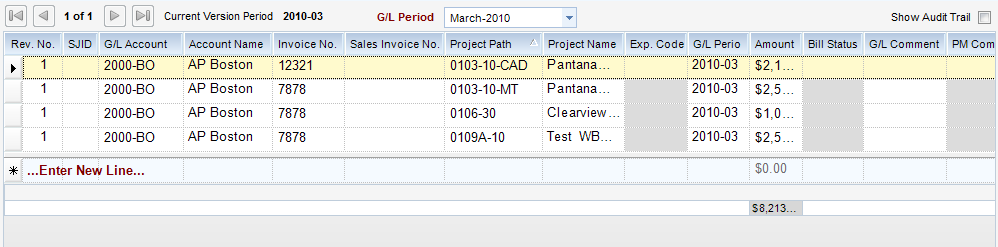
Field Descriptions
| • | Rev. No. - The number of the revision of the Journal entry. The original entry is 1. |
| • | SJID - Sales Journal ID number. |
| • | G/L Account - The G/L account allowed is determined by the payee type. For instance, when client is the payee type, then an A/R account is allowed. |
| • | G/L Account Name - Displays the GL Account Name in the detail section. This is optionally shown through the toolbar under View / Columns. |
| • | Invoice No. - Used only when G/L account is either Accounts Payable or Accounts Receivable. |
| • | Sales Invoice No. - Sales Journal Invoice Number. |
| • | Project Path - WBS Path. Available only when payee type is Vendor and G/L account is metric type Cost. |
| • | Project Name - Displays the Project Name in the detail section. This is optionally shown through the toolbar under View / Columns. |
| • | Exp. Code - Expense code. Available only when payee type is Vendor and G/L account is metric type Cost. |
| • | GL Period - Displays the GL Period in the detail section. This is optionally shown through the toolbar under View / Columns. |
| • | Amount - Extended amount. Read only. Sum of qty X unit rate. |
| • | Bill Status - Billing status. Available only when payee type is Vendor and G/L account is metric type Cost. |
| • | G/L Comments - General ledger comments. Will print on G/L reports in place of comments on header of transactions for this line item. |
| • | PM Comments - Project management comments. Appears on project management reports and invoices. Available only when payee type is Vendor and G/L account is metric type Cost. |