Overview
How to Recalculate Markups
Step 1 - Click on the Recalculate Markups applet. A Recalculate Rates pop-up should appear.
Step 2 - Fill out the box with the appropriate information.
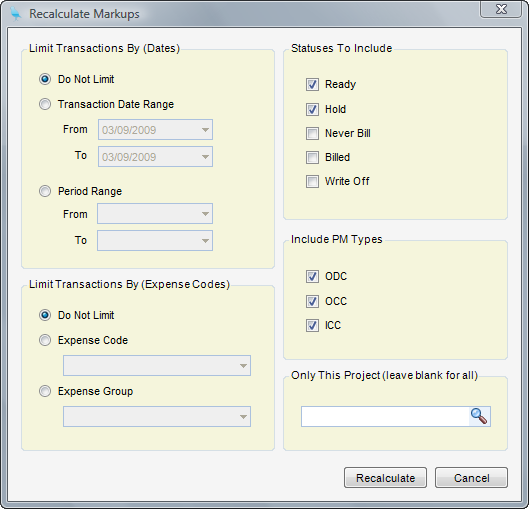
Limit Transactions By (Date) - Choose the dates for which to recalculate the markup rates. Choices are: Do Not Limit, Transaction Date Range, or Period Range.
Limit Transactions By (Expense Codes) - Choose the expense codes for which to recalculate the markup rates. Choices are: Do Not Limit, Expense Codes, or Expense Group.
Statuses to Include:
| • | Ready - When checked, time line items with a bill status of Ready to Bill will be included. |
| • | Hold - When checked, time line items with a bill status of Hold will be included. |
| • | Never Billed - When checked, time line items with a bill status of Never Bill will be included. |
| • | Billed - When checked, time line items with a bill status of Billed will be included. |
| • | Write Off - When checked, time line items with a bill status of Write Off will be included. |
Include PM Types
| • | ODC |
| • | OCC |
| • | ICC |
Only This Project - Here you can select a specific project for which to recalculate markup or leave blank for all projects.
Step 3 - Click Recalculate