Overview
This tab contains general information related to the selected Custom Report type (Custom Report, Action, Data Grid or Warning).
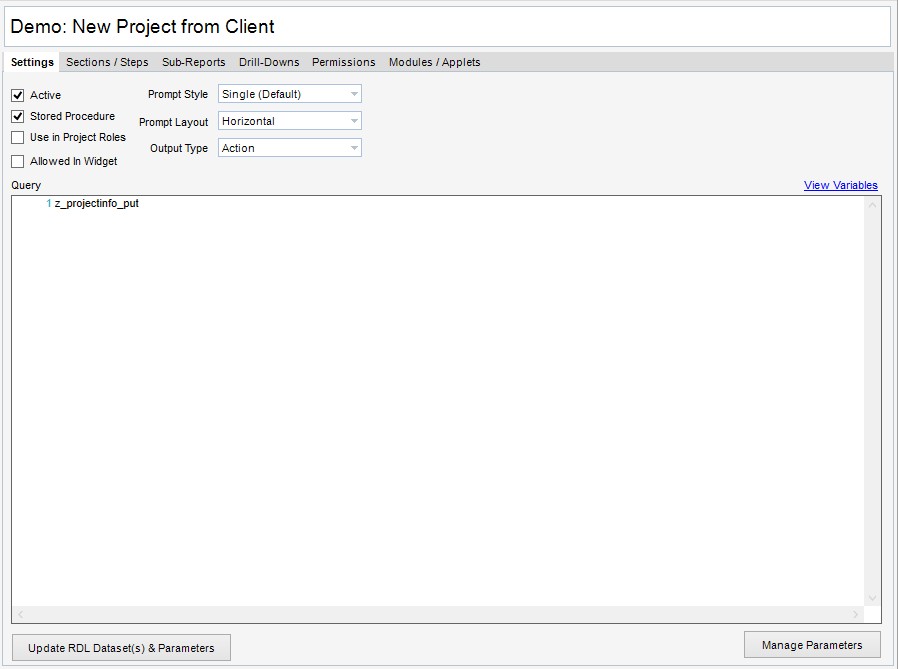
Field Descriptions
| • | Active - Defines whether the selected item is active (checked) |
| • | Stored Procedure - Indicates that the Query below is a stored procedure |
| • | Use in Project Roles - Displays the Custom Report, Action, Data Grid or Warning in Administration>Project Roles |
| • | Allowed in Widget - Allows use of Custom Report, Action, Data Grid or Warning in the Dashboard Report Widget |
| • | Prompt Style - Sets the stye of prompt to be utilized |
| • | Prompt Layout - Sets the layout of the prompt parameters |
| • | Output Type - Defines the output of the selected item |
| • | Query - Contains the defined query to execute |
| • | View Variables - Displays a list of allowed system variables for query writing |
| • | Update RDL Dataset(s) & Parameters - Adds created Parameters to the RDL |
| • | Manage Parameters - Launches the Report Parameters dialogue |
|