Overview
There are cases where you might be doing very similar work spanning multiple timesheets. In these, or other cases, it can be helpful to copy/paste one timesheet to another.
Note: The Timesheet you wish to copy to must exist.
Tutorial
Please complete the following steps:
| 1. | Recall the timesheet to be copied to the screen |
| 2. | Select Copy from the toolbar to receive a list of unsubmitted timesheets to which you can paste |
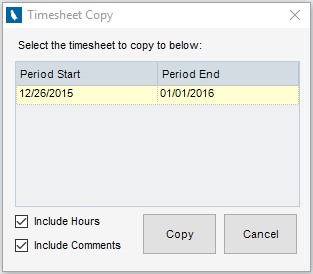
| 3. | Select the Timesheet you wish to copy to. By default the project rows from the loaded timesheet are copied/pasted into the selected Timesheet. Optionally, hours and comments can also be included. |
| 4. | Click Copy |
The content of the loaded timesheet will be copied/pasted to the selected timesheet as specified in the dialogue. Once pasted, please review/complete the new timesheet as appropriate.
Note: Any projects that are no longer valid (inactive) will not be copied.