|
Overview
Each Timesheet period consists of a Start and End date. Below is a discussion on changing the period.
Tutorial
Please complete the following steps:
| 1. | Recall the timesheet to be altered to the screen |
| 2. | From the toolbar Menu, browse to Admin and select Modify Current Timesheet Period |
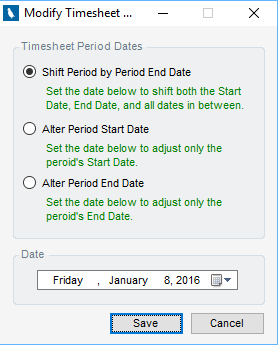
| 3. | Complete the Modify Timesheet Period pop-up. The following options are available: |
| a. | Shift Period By Period End date - When selected, the timesheet is shifted so that it covers the same number of days, but the end date is entered below |
| b. | Alter Period Start Date - This changes the period start date to whatever was entered |
| c. | Alter Period End Date - This changes the period end date to whatever was entered |
| d. | Date - Works in conjunction with the three options above |
| 4. | Click Save to modify the timesheet period coverage dates |
|