Overview
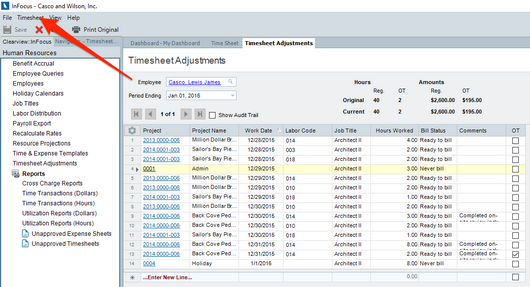
Once a timesheet has received manager approval, it is available to Accounting. Accounting can send it back to the manager or timesheet owner (the employee) from the Timesheets Adjustments applet in General Accounting.
Note: This is available only if no changes have been made by Accounting and the timesheet has not been processed by Labor Distribution.
Tutorial
Please complete the following steps:
| 1. | Browse to Human Resources>Timesheet Adjustments |
| 2. | Load the Employee whose time you wish to review. Note you can use the Employee lookup to search by Employee or the Time ID lookup (upper right hand corner) to directly load the internal time ID. |
| 3. | Select the appropriate action under the Timesheet button on the toolbar. |