Overview
Comments are added on a per-entry basis via the Comments box beneath the timesheet grid or by typing “c” while in the timesheet grid. Once entered, you can apply the comment to all entries for the specified project for the timesheet by clicking Apply Hours to Weekdays, found below the timesheet grid or via the Comments dialogue (launched by typing "c" from the timesheet grid).
If you use boiler-plate comments for certain types of time, you can create a snippet for quick reference via the snippets link below the comments box. Reuse your snippets by clicking the link and inserting the previously created snippet.
All comments for your timesheet can be viewed by clicking Show Comments from the toolbar or by hovering over the cell in the timesheet grid.
Tutorial
Comments are added to a highlighted cell in the timesheet grid and there are two methods:
Keyboard Shortcut
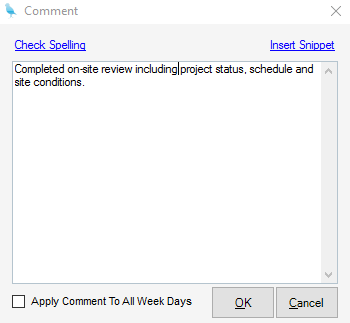
| 1. | Type "C" from the highlighted cell. The Comment dialogue will launch |
| 2. | Add your comments. Optionally, you can insert a Snippet by clicking Insert Snippet |
| 3. | If your comment should apply to all week days on the specified row, check Apply Comment to All Weekdays |
| 4. | Click OK |
| 5. | Click Save |
Comments Box
| 1. | Enter your comments for the highlighted cell in the Comments box below the timesheet grid |
| 2. | Optionally, you can insert a Snippet by clicking Snippet |
| 3. | Click Save |